1. What are ADD and SUB instructions?
Think of ADD and SUB as “calculate these values, then write the result here.”
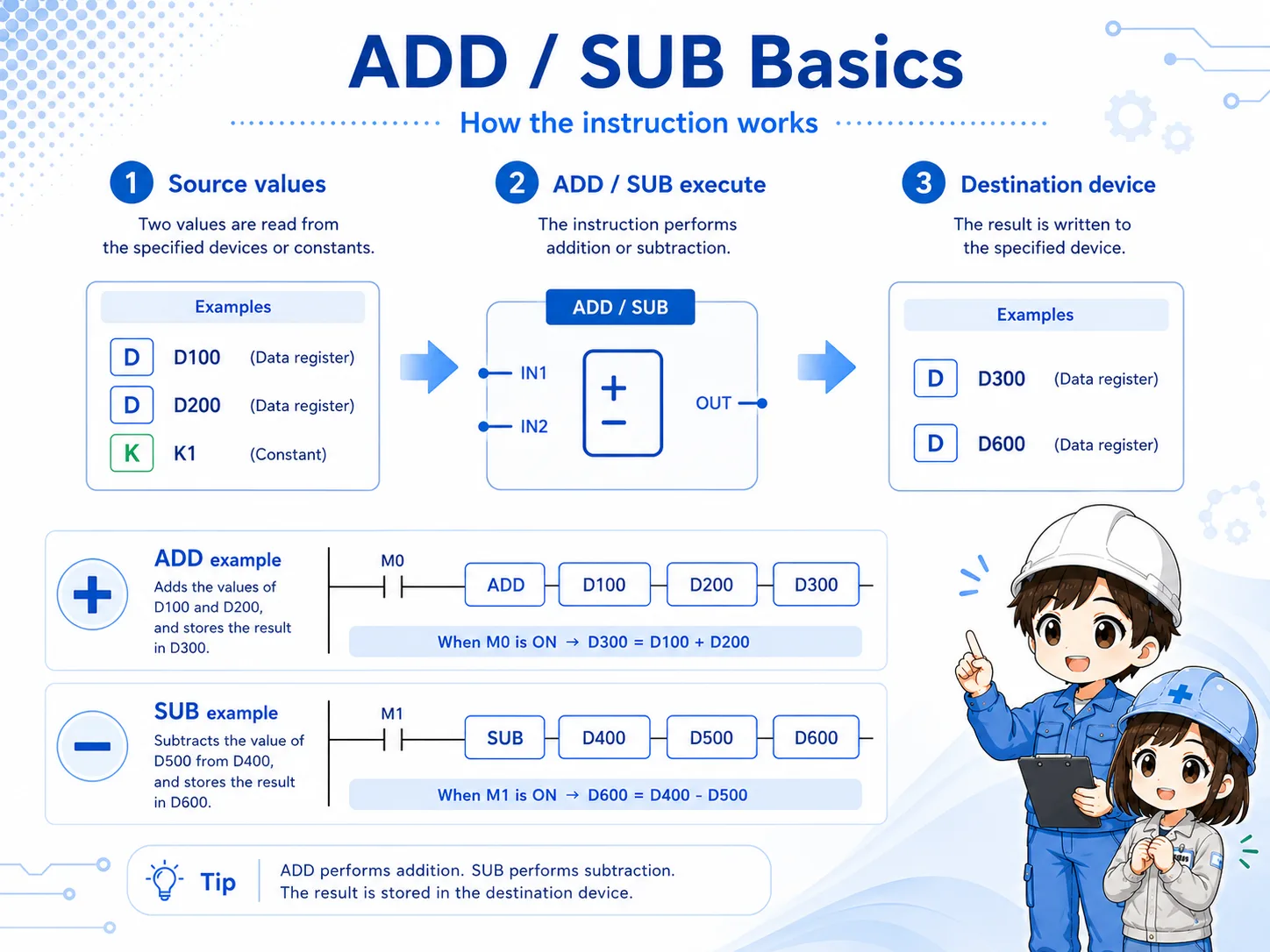
In GX Works3 and MELSEC-style ladder programming, ADD and SUB are basic arithmetic instructions. They use source values, calculate a result, and write that result to a destination device.
The important beginner point is this: the destination device receives the calculated result. If the instruction executes again, the destination may be updated again.
2. Quick conclusion: calculate a value and store the result
The core idea is not complicated, but the destination and scan behavior are easy to miss.
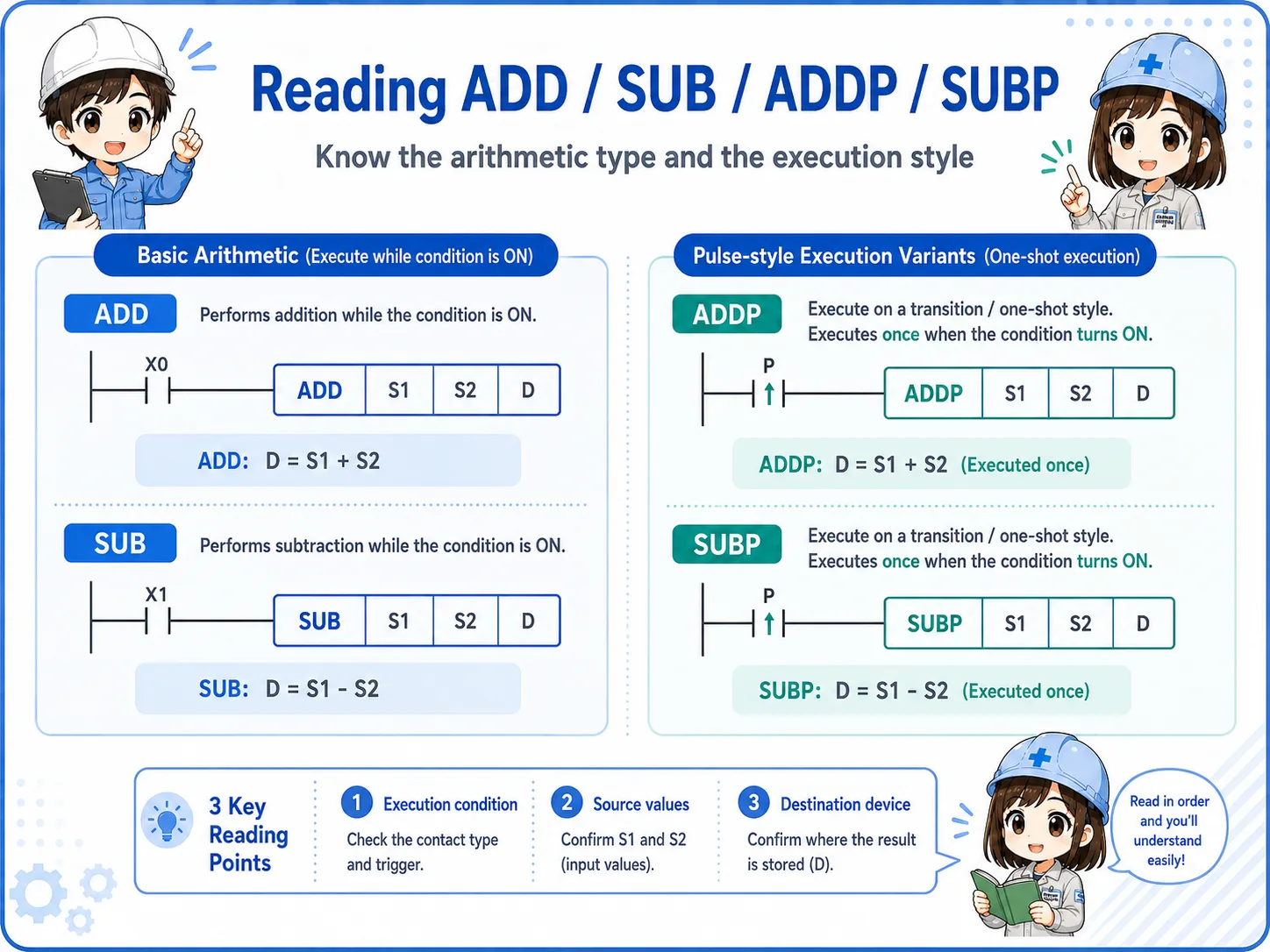
For field reading, understand ADD and SUB as instructions that calculate a value and store the result. The source side provides the values, and the destination side receives the result.
Execution condition
The rung condition allows the instruction to execute.
Source values
Constants or device values are used for the calculation.
Destination device
The calculated result is written to the destination.
Check official manuals for exact details
Instruction details can depend on CPU series, instruction format, device type, and project settings. Use this article as a beginner guide, and check the official Mitsubishi Electric manual or GX Works3 help for actual design work.
3. How to read ADD D10 K1 D10
A common beginner example is adding 1 to a data register and writing the result back.
ADD D10 K1 D10 can be read as “add the value in D10 and the constant 1, then store the result in D10.” In a simple counter-like idea, this looks like increasing the value by 1.
Field reading point
If the source and destination are the same device, the value can keep changing while the instruction continues to execute. Always check the execution condition and scan behavior.
4. How to read SUB D20 K1 D20
SUB is the subtraction side of the same basic idea.
SUB D20 K1 D20 can be read as “subtract the constant 1 from the value in D20, then store the result in D20.” This is often easier to understand if you separate the source values and destination before thinking about the machine behavior.
Do not skip the destination
Beginners often read only “D20 minus 1” and forget to ask where the result goes. The destination device is just as important as the calculation itself.
5. Source values and destination devices
Most arithmetic instruction mistakes come from mixing up the calculation side and the storage side.
An ADD or SUB instruction uses source values and writes the result to a destination device. The source side may be a constant or a device value depending on the instruction and PLC series. The destination is the device that receives the calculated result.
For troubleshooting, read the instruction as a sentence: when this condition is true, calculate these values and write the result here.
6. Common field use cases
ADD and SUB often appear around values that need to increase, decrease, or be adjusted.
- Increasing an internal count by 1 when a certain event occurs.
- Decreasing a remaining quantity or step value.
- Adding an offset before comparing a value.
- Correcting a displayed value or internal calculation value.
- Preparing a value before it is used by comparison, display, or control logic.
Related instruction flow
MOV copies a value, ADD/SUB calculate a value, and comparison instructions judge a value. Reading those roles separately makes ladder programs easier to understand.
7. Watch out for scan-by-scan execution
If the condition stays true, the instruction may execute repeatedly during PLC scans.
One of the most common beginner mistakes is expecting a calculation to happen only once. If the execution condition stays true, the ADD or SUB instruction may keep executing according to the program scan.
This can make a value increase or decrease much faster than expected. When the result looks wrong, do not immediately blame the instruction. First check execution condition, scan, and destination overwrite.
Common failure pattern
A button is intended to add 1 once, but the value continues to increase while the button condition remains true. This is where one-scan logic or pulse execution may need to be considered.
8. Difference between ADD/SUB and ADDP/SUBP
ADDP and SUBP are often discussed when you want one-shot style execution.
In beginner terms, ADD and SUB are the basic arithmetic forms. ADDP and SUBP are often treated as pulse execution forms, used when the calculation should occur at a transition rather than continuously while the condition remains true.
However, the exact instruction behavior and notation should be confirmed in the official manual or GX Works3 help for the target PLC series. Avoid designing real equipment from memory or screenshots alone.
9. Field check points when ADD/SUB does not work
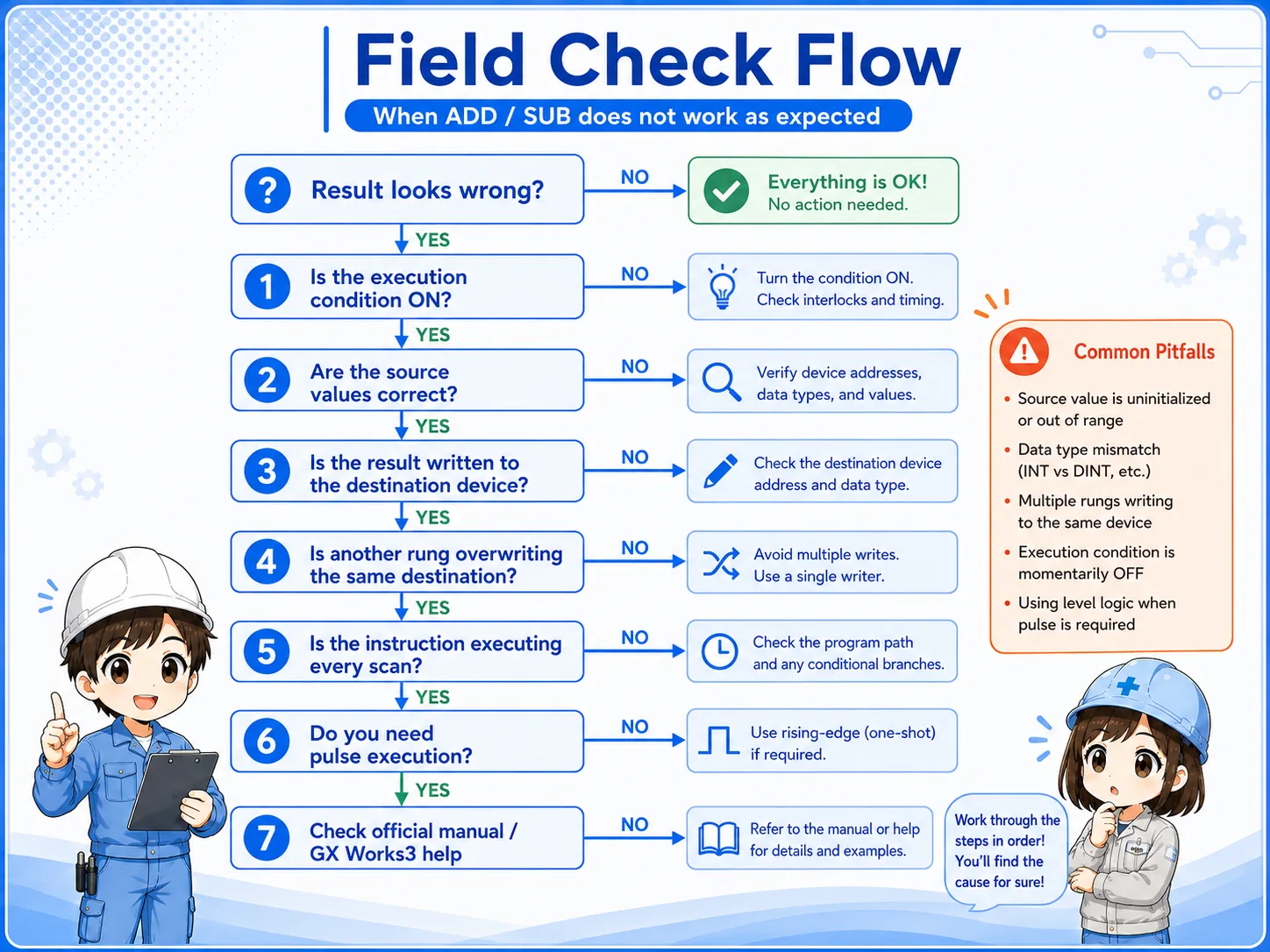
Check the condition, source values, destination, and overwriting before changing the program.
- Confirm that the execution condition is actually true.
- Check the current source values before the instruction executes.
- Check the destination value immediately after execution.
- Search for other instructions that write to the same destination device.
- Check whether the instruction is executing every scan.
- Confirm whether one-shot or pulse execution is required.
- Review the official manual or GX Works3 help before changing instruction variants.
10. GX Works3 monitoring points
Do not monitor only one point. Watch the condition, sources, and destination together.
When monitoring an ADD or SUB instruction in GX Works3, it is safer to watch the execution condition, source values, and destination device at the same time. If you only look at the destination, you may miss the reason it changed.
Three-point monitoring
Watch execution condition, source values, and destination device together. If the destination changes and then changes back, look for another rung that writes to the same device.
11. Common beginner mistakes
Most mistakes are not about arithmetic itself. They are about timing and storage.
- Assuming it runs only once: ADD or SUB may execute repeatedly while the condition remains true.
- Mixing up source and destination: The result is stored in the destination device, not necessarily kept separately.
- Missing overwrites: Another rung may write a different value after the calculation.
- Jumping into advanced variants too early: Confirm the basic data flow before studying 32-bit variants or flags.
- Skipping official references: Always check official manuals for target CPU and instruction details.
12. Summary
ADD and SUB are basic instructions for calculating values and storing the result in a destination device. For beginners, the safest reading method is to follow the execution condition, source values, destination device, scan, and overwrite as one chain.
If you understand this flow, ADD/SUB becomes much easier to connect with MOV, comparison instructions, counters, HMI displays, and field troubleshooting.
Related articles
These articles connect naturally with ADD and SUB instruction basics.